
PriceWise
A conversational shopping agent that searches, compares, reviews, calculates, and asks for approval before risky external actions.
Compresses a multi-tab purchase research session into one structured recommendation with a transparent action trail.
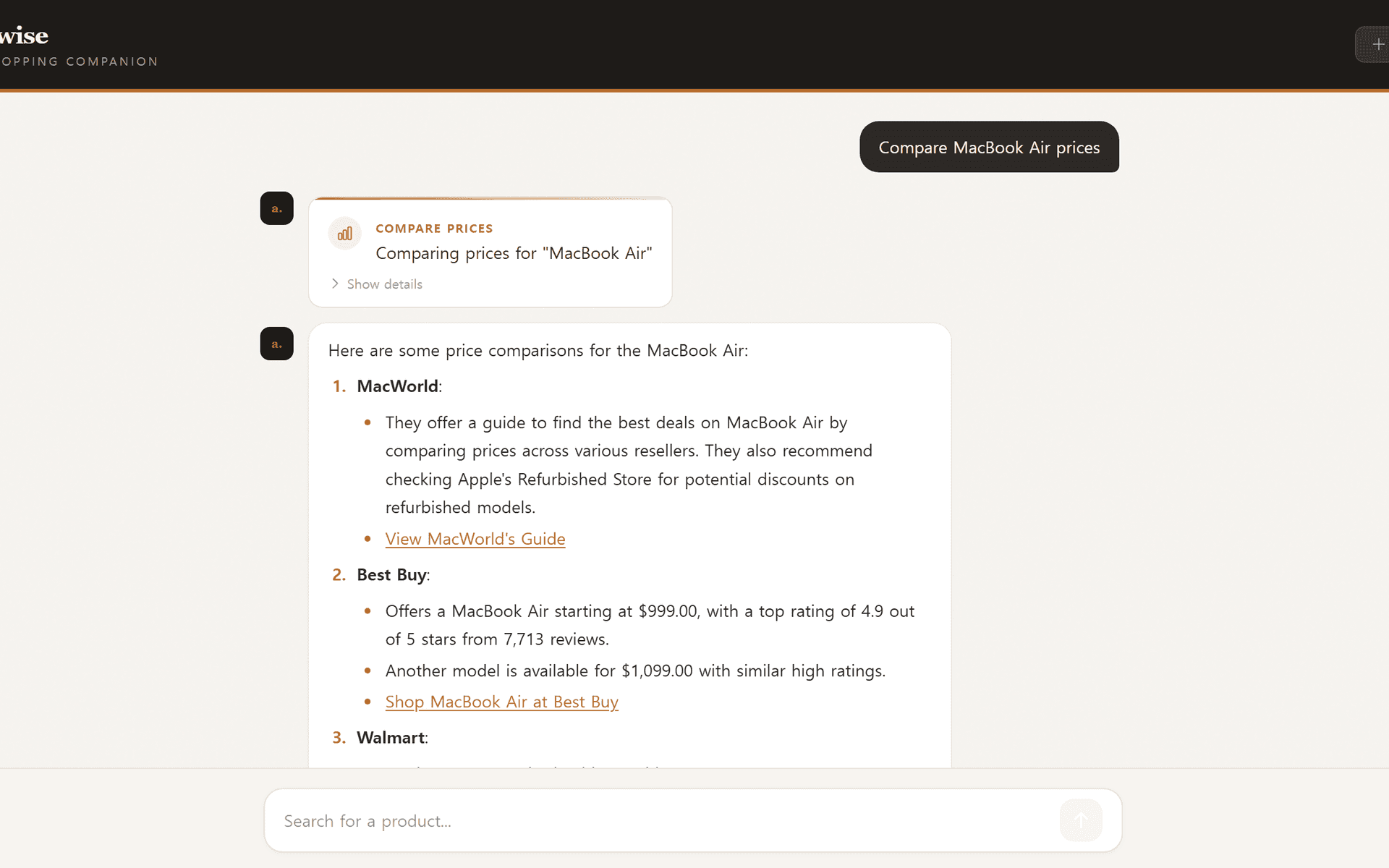

PriceWise
Engineered a LangGraph agent with 10 orchestrated tools, dual-mode SSE streaming, persistent checkpointing via AsyncPostgresSaver, and conversation summarization with safe message splitting.
tools
10 agent tools
control
selective approvals
transport
dual SSE streams
Quick read
An autonomous AI shopping agent that compares prices and reviews across retailers, delivering structured receipts via a conversational interface with selective human-in-the-loop approval.
The Problem With Shopping Research
Every considered purchase follows the same exhausting ritual: open a dozen tabs, search for the product on three different retailers, skim reviews, mentally convert prices with tax, forget which site had the better deal, and start over. Browser extensions and deal aggregators help at the margins, but none of them actually synthesize information across sources into a single, coherent recommendation. I wanted to build something that could do the entire research loop in one conversation — not just surface links, but compare, calculate, and advise.
That's how PriceWise started: an autonomous shopping research agent that takes a natural-language request like “find me the best mechanical keyboard under $150” and handles the rest. It searches for products, compares prices across retailers, gathers and summarizes reviews, checks availability, hunts for coupons, calculates budget impact with tax, and delivers a structured receipt with a clear recommendation. The entire workflow is conversational. You describe what you want, the agent does the legwork, and you stay in control the whole time.
An Agent With Ten Tools and a Trust Layer
Under the hood, PriceWise is a LangGraph ReAct agent powered by OpenAI gpt-4o, served through a FastAPI streaming backend, and presented via a Next.js chat frontend. The agent has access to ten tools: product search, price comparison, review aggregation, URL scraping, coupon and deal finding, availability checking, budget calculation, wishlist management, and a multi-product delegation tool that fans out parallel searches when you ask for several items at once. All web-facing tools are powered by the Tavily search API, which returns clean parsed content instead of raw HTML — ideal for feeding directly into an LLM context window.
But giving an agent ten tools and letting it run unsupervised felt wrong. Seven of those tools make external API calls, and I wanted users to see exactly what the agent was about to do before it did it. That meant building a human-in-the-loop approval system — but not one that interrupted on every single tool call. Budget calculations and wishlist lookups are pure local computation; pausing for approval on those would just be annoying. I needed selective interrupts: pause for the dangerous tools, auto-execute the safe ones.
The Selective Interrupt Problem
This turned out to be the most interesting technical challenge in the project. LangGraph's built-in interrupt mechanism is all-or-nothing — you can tell the framework to pause before the tools node runs, but that pauses before every tool call regardless of which tool was invoked. There's no native way to say “interrupt for search but not for budget calculation.”
My first instinct was to wrap individual tool functions with a decorator that calls LangGraph's interrupt function inside the tool body itself, shifting the pause from the graph level down to the tool level. The idea was simple: before the original tool logic runs, call interrupt with the tool name and arguments. The graph pauses, the frontend shows an approval prompt, and when the user approves, execution resumes from inside the wrapper. Safe tools skip the wrapper entirely.
The catch is that LangChain's tool decorator doesn't produce a plain function — it produces a StructuredTool object with metadata the LLM depends on: the tool's name, description, and argument schema. A naive function wrapper strips all of that metadata away, and suddenly the model can't generate valid tool calls anymore because it has lost the schema it needs.
The solution was surprisingly elegant: shallow-copy the entire StructuredTool object using Python's copy module, then swap only the internal function attribute on the clone. The copy preserves every piece of metadata — name, description, argument schema — while the new function attribute adds the interrupt call before delegating to the original implementation. The original tool object stays untouched, which matters for testing tools outside a graph context. The wrapper function calls LangGraph's interrupt with a dictionary containing the tool name and arguments. If the user denies execution, it returns a polite refusal message that the agent can incorporate into its response. If approved, it calls through to the original function normally.
The overhead of this approach is negligible in practice. The interrupt serialization adds a round-trip, but every tool behind this wrapper is already making an external API call with hundreds of milliseconds of latency. An extra function call is invisible next to a network request.
Streaming Everything in Real Time
The frontend needs to feel alive while the agent works, which means streaming tokens as they arrive, showing tool call notifications, rendering approval prompts, and displaying the final structured receipt — all over a single SSE connection. I run two LangGraph stream modes simultaneously: a messages mode for per-token delivery that powers the typing animation, and an updates mode for complete tool results that populate tool cards in the UI. After the stream ends, a post-stream state inspection checks whether the agent paused at an interrupt or completed with a structured Pydantic receipt. That interrupt state lives in the checkpoint, not in the stream itself, so the streaming logic and control-flow logic stay cleanly separated.
PriceWise supports persistent conversations through LangGraph's AsyncPostgresSaver, allowing a PostgreSQL-backed deployment to preserve sessions across restarts. The backend deploys to Railwaywith a Docker image built using uv for fast dependency installation, while the frontend deploys to Vercel. In production, the browser calls Railway directly for SSE streams, bypassing Vercel's serverless timeout entirely.
What It Adds Up To
PriceWise compresses a multi-tab research workflow into a single conversation. The agent handles the full pipeline — search, compare, review, calculate, recommend — while the user retains approval authority over every external action. The architecture is deliberately modular: adding a new tool means writing one function with a Pydantic schema and appending it to the agent's tool list. The model is initialized through LangChain's provider interface, keeping a provider change localized to the agent configuration. The complexity lives in the orchestration boundaries, not in the individual components, and that's exactly where I wanted it.
Next case study
Colonial Archives